
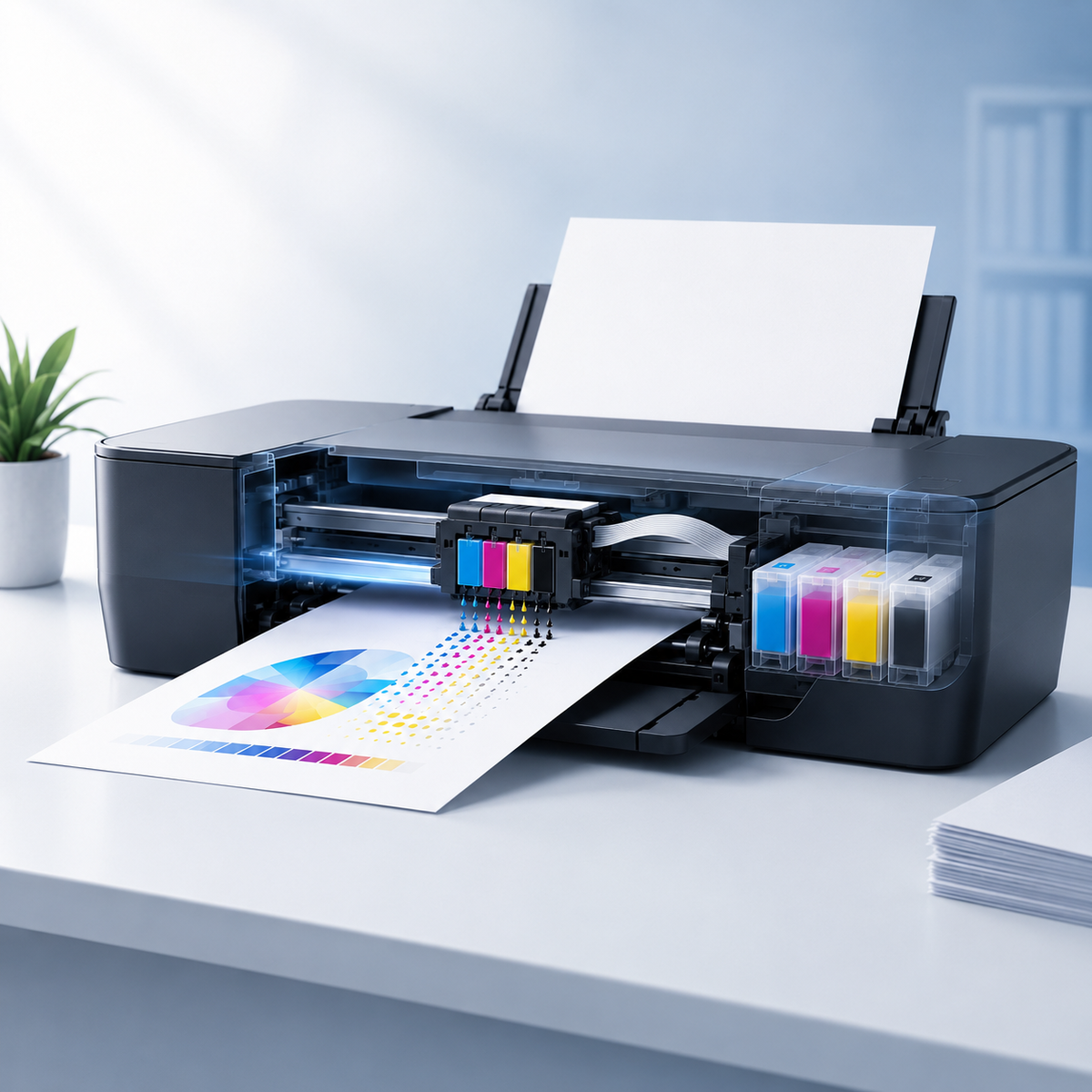
Inkjet printers are common in homes, schools, and small offices because they can produce everything from everyday documents to detailed color images. But what actually happens after you click Print? In simple terms, an inkjet printer moves a printhead across the page and places extremely small droplets of ink in precise locations. The printer repeats this process line by line until the document or image is complete.
The Short Answer: How Inkjet Printing Works
An inkjet printer receives a digital file, converts it into a map of tiny dots, feeds paper through the machine, and places microscopic ink droplets onto the paper. The ink may come from individual color cartridges, a combined color cartridge, or an internal ink tank. The printhead controls where each droplet lands.
The process is fast enough to feel instant, but it involves careful coordination between software, motors, sensors, ink delivery channels, and the paper-feed system.
The Main Parts of an Inkjet Printer
Although printer designs vary, most inkjet models rely on the same core components.
1. Ink Cartridges or Ink Tanks
The printer needs black and color ink. Many models use black, cyan, magenta, and yellow, while photo-focused printers may add extra shades to improve tonal range. Some printers store ink in replaceable cartridges; others use refillable reservoirs.
2. The Printhead
The printhead is the component that releases ink through very small nozzles. In some printers, the printhead is built into the cartridge. In others, it is a permanent or semi-permanent part of the printer. This difference matters when diagnosing print-quality problems because a blocked nozzle may be associated with either the cartridge or the printer itself.
3. The Carriage and Drive System
The carriage moves the printhead from side to side. A motor and belt position it accurately while the paper advances in controlled steps. This movement allows the printer to build a page one narrow band at a time.
4. Paper Feed Rollers
Rollers pull paper from the tray and keep it aligned. Dust, worn rollers, damp paper, or an overloaded tray can cause skewing, multiple-sheet feeding, or paper jams.
5. Printer Driver and Firmware
The printer driver translates the document into instructions the printer can understand. Firmware manages the printer's internal operations. Correct settings and current software can affect paper handling, color output, resolution, and communication with the computer or mobile device.
What Happens After You Click Print?
1. The application sends the document to the printer driver.
2. The driver converts text, graphics, and images into printable data.
3. The printer checks its status, available paper, and ink system.
4. Rollers move a sheet into the print path.
5. The printhead travels across the page and releases ink droplets in precise patterns.
6. The paper advances slightly after each pass until the page is complete.
7. The finished sheet exits the printer and the ink begins settling into the paper surface.
How Four Ink Colors Create So Many Shades
Most color inkjet printers use cyan, magenta, yellow, and black, commonly described as CMYK. By placing different combinations and densities of these colors close together, the printer creates the appearance of many additional colors. Black ink improves text clarity and helps create deeper shadows without using excessive amounts of color ink.
The final result depends on more than the cartridge. The printer's color management, the paper coating, the selected print mode, and the original image quality all influence how colors appear.
Dye-Based Ink vs. Pigment-Based Ink
Ink formulas are not all the same. Dye-based ink is known for vivid color and smooth photo reproduction because the colorant is dissolved in the liquid. Pigment-based ink contains tiny solid color particles and is often valued for crisp text and stronger resistance to moisture or fading on suitable media.
Some printers use pigment black ink for documents and dye-based color ink for graphics and photos. Always choose supplies designed for the exact printer model because the ink delivery system and formula requirements can differ.
Why Paper Changes the Result
Plain office paper absorbs ink differently from coated photo paper. On highly absorbent paper, ink may spread slightly, reducing edge sharpness. Coated media keeps droplets closer to the surface, which can produce stronger color and finer detail. Selecting the correct paper type in the print settings helps the printer adjust ink placement and drying behavior.
Why Inkjet Printers Need Regular Use
Inkjet nozzles are extremely small. If a printer remains unused for an extended period, ink around the nozzle area can dry and interrupt flow. Printing a small page periodically and turning the printer off with its normal Power button can help the printer park and protect the printhead correctly.
When output becomes faded, streaky, or incomplete, a nozzle check is usually a better first step than repeatedly running deep-cleaning cycles. Cleaning consumes ink, so follow the maintenance sequence recommended for your printer model.
What Determines Inkjet Print Quality?
· The resolution and quality of the original file
· The printer's print mode and paper-type setting
· The condition and compatibility of the ink supply
· The health and alignment of the printhead
· The surface, weight, and moisture level of the paper
· The printer driver, firmware, and color settings
Frequently Asked Questions
Does an inkjet printer touch the paper?
The printhead normally travels very close to the paper without intentionally touching it. Wrinkled, curled, or incorrectly loaded media can rise into the print path and cause smudging or head strikes.
Does an inkjet printer use heat?
Some inkjet technologies use heat inside the printhead to create and eject droplets, while others use a mechanical piezoelectric action. The user experience is similar, but the internal method depends on the printer design.
Why does a printer use color ink when printing black text?
Some print modes use small amounts of color ink for tone balancing, printhead maintenance, or composite black. Settings and printer design vary, so choosing a black-only or grayscale option does not always guarantee that no color ink will be used.
Can inkjet printers print photos?
Yes. Many inkjet printers produce strong photo results when used with suitable photo paper, high-resolution files, and the correct print settings.
Final Takeaway
An inkjet printer is a precision system, not simply a box that puts ink on paper. Cartridges supply the ink, the printhead controls the droplets, the carriage and rollers manage movement, and the software coordinates the entire process. Understanding these basics makes it easier to choose supplies, improve print quality, and troubleshoot problems without unnecessary trial and error.